Windows で GUI アプリを作るなら、今どきは WinUI 3 が“正解”なのかもしれません。でも実際に触ってみると、起動の重さが気になってしまい、どうにも魅力を感じられませんでした。結局のところ、モダンな見た目よりも 速度 が最優先だと再確認させられました。
最速を狙うなら、やはり C++/Win32 か C#/WinForms ですね。このあたりがいまだに強いのは、シンプルで無駄がなく、OS の素の力をそのまま引き出せるからだと思います。
そこで今回は、WinForms から Direct2D / DirectWrite を直接扱う方法を試してみました。ただ、低レベル API を素手で触るのは想像以上に手間がかかります。ライブラリは使わず P/Invoke で直接呼び出そうとしたものの、細かい構造体や COM 周りでつまずき、思ったように動いてくれませんでした。
そんな中で見つけたのが、SharpDX の後継として開発されている Vortice です。NuGet から Vortice.Direct2D1 を追加するだけで使えて、MIT ライセンスの軽量なオープンソースです。Direct2D や DirectWrite を .NET からシンプルに扱える、ちょうどいいラッパーになっています。
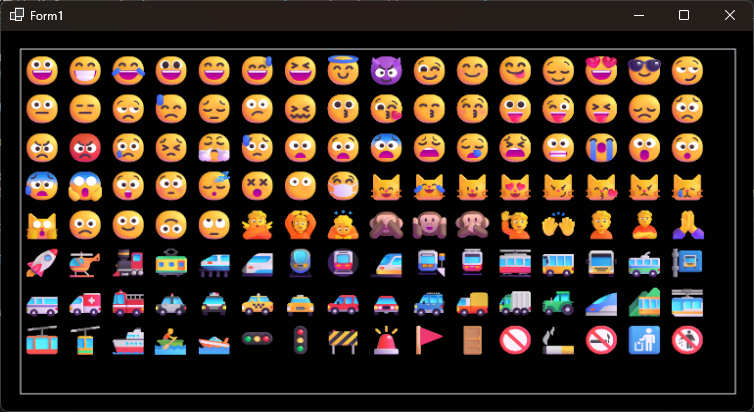
特に嬉しいのは、DirectWrite のカラーフォント(絵文字)に対応していること。WinForms でも簡単にカラー絵文字を描画できるので、古い UI フレームワークでもまだまだ活躍できそうです。
Vortice.Windows
Vortice は .NET から DirectX 系 API を扱うためのオープンソースライブラリです。SharpDX が開発終了したあと、その後継として作られたプロジェクトで、Direct2D / DirectWrite / Direct3D / DXGI / WIC / XAudio / XInput などをC# から安全かつ高速に使えるようにしてくれます。

利用方法
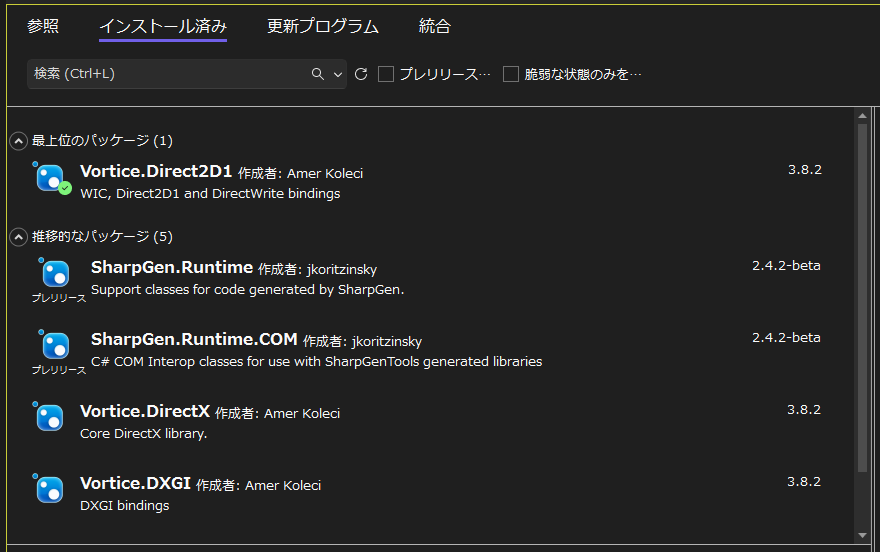
Visual Studio の NuGet パッケージマネージャーから Vortice.Direct2D1 をインストールします。
サンプルコード
DirectWrite で文字を描画する主なメソッドは、DrawText、DrawTextLayout、DrawGlyphRun の 3 つです。DrawText と DrawTextLayout は、メモ帳のような “ふっくらしたカラー絵文字” を簡単に描画できます。サンプルコードは DrawText を利用しています。
using Vortice;
using Vortice.Direct2D1;
using Vortice.DirectWrite;
using Vortice.Mathematics;

namespace WinFormsApp1
{
    public partial class Form1 : Form
    {
        private ID2D1Factory d2dFactory;
        private IDWriteFactory dwFactory;
        private ID2D1HwndRenderTarget renderTarget;
        private ID2D1SolidColorBrush brush;
        private IDWriteTextFormat textFormat;

        public Form1()
        {
            InitializeComponent();
        }

        protected override void OnLoad(EventArgs e)
        {
            base.OnLoad(e);

            this.d2dFactory = D2D1.D2D1CreateFactory<ID2D1Factory>();

            this.dwFactory = DWrite.DWriteCreateFactory<IDWriteFactory>();

            var hwndProps = new HwndRenderTargetProperties();

            hwndProps.Hwnd = Handle;
            hwndProps.PixelSize = new SizeI((int)Width, (int)Height);
            hwndProps.PresentOptions = PresentOptions.None;

            this.renderTarget = this.d2dFactory.CreateHwndRenderTarget(
                new RenderTargetProperties(),
                hwndProps
            );

            this.textFormat = this.dwFactory.CreateTextFormat(
                "Yu Gothic UI",
                null,
                FontWeight.Normal,
                Vortice.DirectWrite.FontStyle.Normal,
                FontStretch.Normal,
                32.0f,
                "ja-jp"
            );

        }

        protected override void OnResize(EventArgs e)
        {
            base.OnResize(e);

            if (this.renderTarget != null)
            {
                this.renderTarget.Resize(new SizeI((int)Width, (int)Height));
                Invalidate();
            }
        }

        protected override void OnPaint(PaintEventArgs e)
        {
            this.renderTarget.BeginDraw();
            this.renderTarget.Clear(new Vortice.Mathematics.Color(1, 1, 1, 1));

            this.brush = renderTarget.CreateSolidColorBrush(Vortice.Mathematics.Colors.AliceBlue);

            this.renderTarget.DrawRectangle(new RawRectF(20, 20, 750, 400), this.brush);

            this.renderTarget.DrawText(
                "😀😁😂😃😄😅😆😇😈😉😊😋😌😍😎😏\n😐😑😒😓😔😕😖😗😘😙😚😛😜😝😞😟\n😠😡😢😣😤😥😦😧😨😩😪😫😬😭😮😯\n😰😱😲😳😴😵😶😷😸😹😺😻😼😽😾😿\n🙀🙁🙂🙃🙄🙅🙆🙇🙈🙉🙊🙋🙌🙍🙎🙏\n🚀🚁🚂🚃🚄🚅🚆🚇🚈🚉🚊🚋🚌🚍🚎🚏\n🚐🚑🚒🚓🚔🚕🚖🚗🚘🚙🚚🚛🚜🚝🚞🚟\n🚠🚡🚢🚣🚤🚥🚦🚧🚨🚩🚪🚫🚬🚭🚮🚯",
                textFormat,
                new Vortice.Mathematics.Rect(20, 20, 750, 400),
                this.brush,
                DrawTextOptions.EnableColorFont
            );

            this.renderTarget.EndDraw();
        }
    }
}
おわりに
ウィンドウハンドルに描画するので GDI のキャレット(Caret)もそのまま利用できる点がいいですね。テキストエディタ作成にぴったりです。

コメント